
10 KiB
RMX-19 - 19" Rack Digital Sound Module (VST3 / AU)
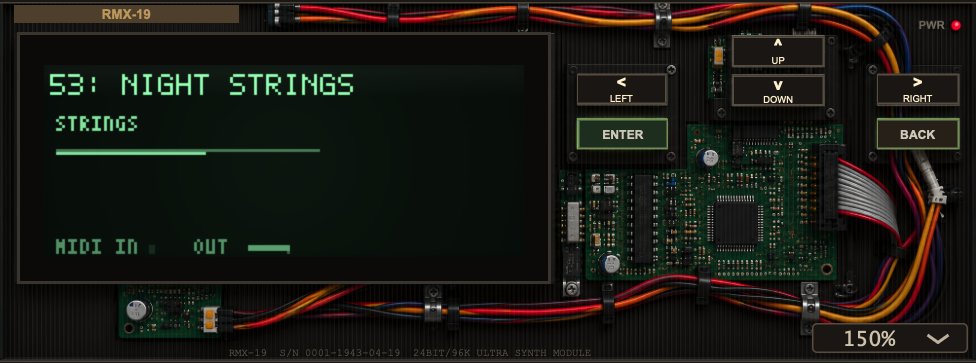
RMX-19 is a virtual analog synthesizer implemented as an audio plugin. It is styled as a piece of 19-inch studio rack hardware from the late 1980s / early 1990s, complete with a working dot-matrix LCD, a metal faceplate, nav-diamond buttons, and a green-on-black display - but underneath it is a fully modern JUCE-based software instrument that runs inside any DAW that hosts AU or VST3 plugins on macOS (Apple Silicon).
The plugin is a self-contained subtractive synth: two oscillators, a state-variable filter, dual envelopes, an LFO, a built-in FX unit (chorus / delay / space), and a factory patch bank - all edited and browsed through the on-screen LCD instead of a conventional panel of knobs.
What it is at a glance
| Format | VST3 and Audio Unit (AU) plugin |
| Transport | Host JUCE-based AU / VST3 on macOS arm64 |
| Architecture | Subtractive / virtual-analog synthesizer |
| UI model | Simulated 19" rack module with a 160×64 dot-matrix LCD |
| Voice count | 16-voice polyphonic engine (1–16 selectable) |
| Audio | 24-bit/96 kHz capable; optional 2× HQ oversampling |
| MIDI | Note on/off, aftertouch-style CCs, pitch wheel, sustain pedal |
Feature overview
Sound engine
- Two oscillators per voice, each with five waveforms: sine, triangle, sawtooth, pulse, and noise.
- Oscillator mix (blend between OSC1 and OSC2) and detune (in cents) for rich, thick unison-style stacking.
- State-variable filter in the Chamberlin style with three modes: low-pass, band-pass, and high-pass, plus cutoff, resonance, filter envelope amount, and key tracking.
- Two ADSR envelopes: one for the amplifier and one for the filter, each with independent attack / decay / sustain / release.
- One LFO with rate, depth, and four selectable shapes (sine, triangle, square, sample-and-hold), routable to three targets: filter cutoff, pitch, or amplitude (tremolo).
- Portamento / glide per patch, master tune (±12 semitones).
- Voice panning: user pan plus a small per-voice random offset to spread the stereo image.
Effects
The FX unit is stacked chorus and delay, selectable via FX TYPE:
- OFF - bypass.
- CHORUS - modulated short delay (uses the FX time as a base).
- DELAY - ping-pong-style feedback delay with a cross-feedback network.
- SPACE - a combination of chorus + delay (widened stereo ambience).
FX DEPTH sets the wet/dry mix; FX TIME sets the delay time in seconds when running free. Crucially, the delay can also be quantized to the host tempo (see below).
Delay tempo sync
The delay can be locked to your DAW's transport tempo. On the FX screen
there is a fourth row labeled SYNC that chooses from these rhythmic
divisions (values are multiplied against 60 / BPM to derive the delay in
seconds):
| SYNC value | Music-notation equivalent |
|---|---|
OFF |
free (use FX TIME in seconds) |
1/16 |
sixteenth note |
1/8 |
eighth note |
1/8T |
eighth-note triplet |
1/8D |
dotted eighth |
1/4 |
quarter note |
1/4T |
quarter-note triplet |
1/4D |
dotted quarter |
1/2 |
half note |
3/4 |
dotted half |
1/1 |
whole note |
When a SYNC value other than OFF is selected, the FX TIME knob is ignored
for the delay and the delay time follows the host tempo in real time.
Factory patches
RMX-19 ships with a hand-tuned bank of factory presets organized by category (POLY PAD, KEY, BASS, LEAD, and more). Patches are stored as parameter settings and can be recalled either from the LCD patch browser or from the DAW's own program list.
The rack front panel (UI)
The plugin looks like a 19" rack unit sitting in your DAW. The main elements:
- LCD display - the green-on-black dot-matrix screen where all editing happens.
- Nav diamond (
▲ ▼ ◀ ▶) - move the cursor / change values. - ENTER and BACK - confirm a selection or return to the previous screen.
- UI scale dropdown (bottom-right) - resize the whole rack anywhere from 50% to 300%.
- A power LED and cosmetic backplate graphics round out the hardware illusion.
You can also drive the whole interface with the keyboard: arrow keys for navigation, Return / Space for ENTER, and Escape for BACK.
Using the LCD
The interface is a small nested menu system:
- SPLASH - the boot-up screen; press ENTER to continue.
- HOME - shows the current patch number, name, category, and a live voice-activity bar. Use ◀/▶ (or ▲/▼) to step through patches.
- MENU - eight destinations:
PATCH,VOICE,FILTER,ENVELOPE,LFO,FX,MASTER,ABOUT. - PATCH - scroll through the factory bank; press ENTER to load the highlighted patch.
- VOICE / FILTER / ENVELOPE / LFO / FX / MASTER - parameter screens. Highlight a row and use ◀/▶ to adjust it (defaults to fine steps).
The parameter screens
| Screen | Parameters |
|---|---|
| VOICE | OSC1 WAVE, OSC2 WAVE, DETUNE, OSC BAL |
| FILTER | FILTER TYPE, CUTOFF, RESONANCE, FILT ENV, KEY TRACK |
| ENVELOPE | AMP ATTACK, AMP DECAY, AMP SUSTAIN, AMP RELEASE, FENV ATTACK, FENV DECAY, FENV SUSTAIN, FENV RELEASE |
| LFO | LFO RATE, LFO SHAPE, LFO DEPTH, LFO TARGET |
| FX | FX TYPE, FX DEPTH, FX TIME, SYNC (delay tempo sync) |
| MASTER | MASTER VOL, STEREO PAN, POLYPHONY, PORTAMENTO, MASTER TUNE, HQ MODE |
Finding the delay sync. On the FX screen the rows are FX TYPE, FX DEPTH, FX TIME, and then a fourth row labeled SYNC. Press DOWN three times from the top of the FX screen to reach it, then use ◀/▶ to pick a rhythmic division (see the table above).
About screen
Shows the RMX-19 build: git branch / SHA / dirty marker, the build date/time, the JUCE version, and the target platform. The LCD footer also shows the git branch@commit and build timestamp on every screen.
MIDI
RMX-19 accepts MIDI input and maps the following messages:
| MIDI | Action |
|---|---|
| Note on / off | Play / release voices |
| Pitch wheel | ±2 semitones, smoothed |
| CC 64 | Sustain pedal (sustains held notes) |
| CC 1 / 74 | Filter cutoff |
| CC 2 / 71 | Filter resonance |
| CC 3 / 76 | LFO rate |
| CC 4 / 91 | FX depth |
| CC 7 | Master volume |
| CC 10 | Stereo pan |
| CC 72 | Amp release |
| CC 73 | Amp attack |
| CC 77 | LFO depth |
The plugin also exposes each patch as a DAW program, so preset changes from the host map onto the factory bank.
DSP notes
- Voice engine - each voice is a classic two-osc → mix → SVF filter →
amp-envelope chain. The oscillator mix is a crossfade between OSC1 and
OSC2, and detune offsets OSC2's frequency (OSC1 ×
2^(detune/1200)). - Filter - a stable Chamberlin state-variable filter; cutoff is modulated by the filter envelope, key tracking, the LFO, and the mod wheel, with a smoothed control signal to suppress zipper noise.
- Envelopes - exponential ADSRs (attack/decay/release are time-domain tau-based approximations, sustain is a level).
- HQ mode - a MASTER-screen toggle that renders the engine at 2× the host sample rate internally, then downsamples, reducing alias artifacts at high cutoff / bright oscillators.
- Output stage - per-sample
tanhsoft-clipping plus a DC-blocking filter, and a master volume gain. - FX - a modulated short delay (chorus) and a cross-feedback delay line (delay). The feedback delay supports host-tempo sync via the SYNC setting. Tail length is sized to fit the longest possible sync delay.
Building from source
Prerequisites
- macOS on Apple Silicon (arm64), macOS 12.0 or later
- CMake ≥ 3.22
- A C++17 compiler (Apple Clang via Xcode / Command Line Tools)
git(to fetch the JUCE framework)
The build fetches JUCE 8.0.4 automatically into build/JUCE on first
configure - no manual JUCE setup is required.
Commands
make            # configure + build VST3 and AU (Release, arm64)
make install    # build, ad-hoc codesign, and install into ~/Library/Audio/Plug-Ins
make uninstall  # remove installed bundles
make clean      # delete the build tree (and the fetched JUCE)
make info       # print build paths
make (configure) is designed to be cheap when nothing changed and refreshes
the git branch/hash and timestamp embedded in the LCD footer on every
configure, so the About screen always reflects the current source state.
Notes
- After
make install, restart (or cold-start) your DAW so macOS rescans AudioComponents. A freshly-installed AU may not appear until the host is relaunched. - Installed bundles are ad-hoc code-signed; if your DAW refuses to load the
AU, run
codesign --force --deep --sign - <bundle>again or re-install.
Project layout
CMakeLists.txt          Build configuration (JUCE plugin target, git build info)
Makefile                Building / installing convenience wrapper
b3.png                  Rack faceplate background image (embedded as binary data)
Source/
  PluginProcessor.cpp/.h Audio processor: MIDI, FX engine, patch I/O, state save/load
  PluginEditor.cpp/.h    Rack front panel: buttons, scale dropdown, rendering
  LcdPanel.cpp/.h        Dot-matrix LCD: all screens, navigation, glyph rendering
  SynthEngine.cpp/.h     The voice / oscillator / filter / envelope DSP core
  Params.cpp/.h          Parameter table, formatting, UI value stepping, delay sync names
  PresetBank.cpp/.h      Factory patch definitions and bank lookup
  Probe.cpp              Offline dev probe (scripted MIDI, no GUI/DAW)
  BuildInfo.h.in         Compile-time git/timestamp template
Development probe
Source/Probe.cpp is an offline executable (rmx_probe) used during
development to drive the processor with scripted MIDI events without a DAW or
GUI. It is defined in CMakeLists.txt for convenience and is not part of the
shipped plugin.
License / attribution
RMX-19 is a personal / hobby project. It is built on the JUCE audio framework under its own license. The rack hardware aesthetic pays tribute to classic 90s synthesizer rack gear; the plugin is an original implementation and is not affiliated with or endorsed by any hardware manufacturer.