
6.6 KiB
Gelyk EQ
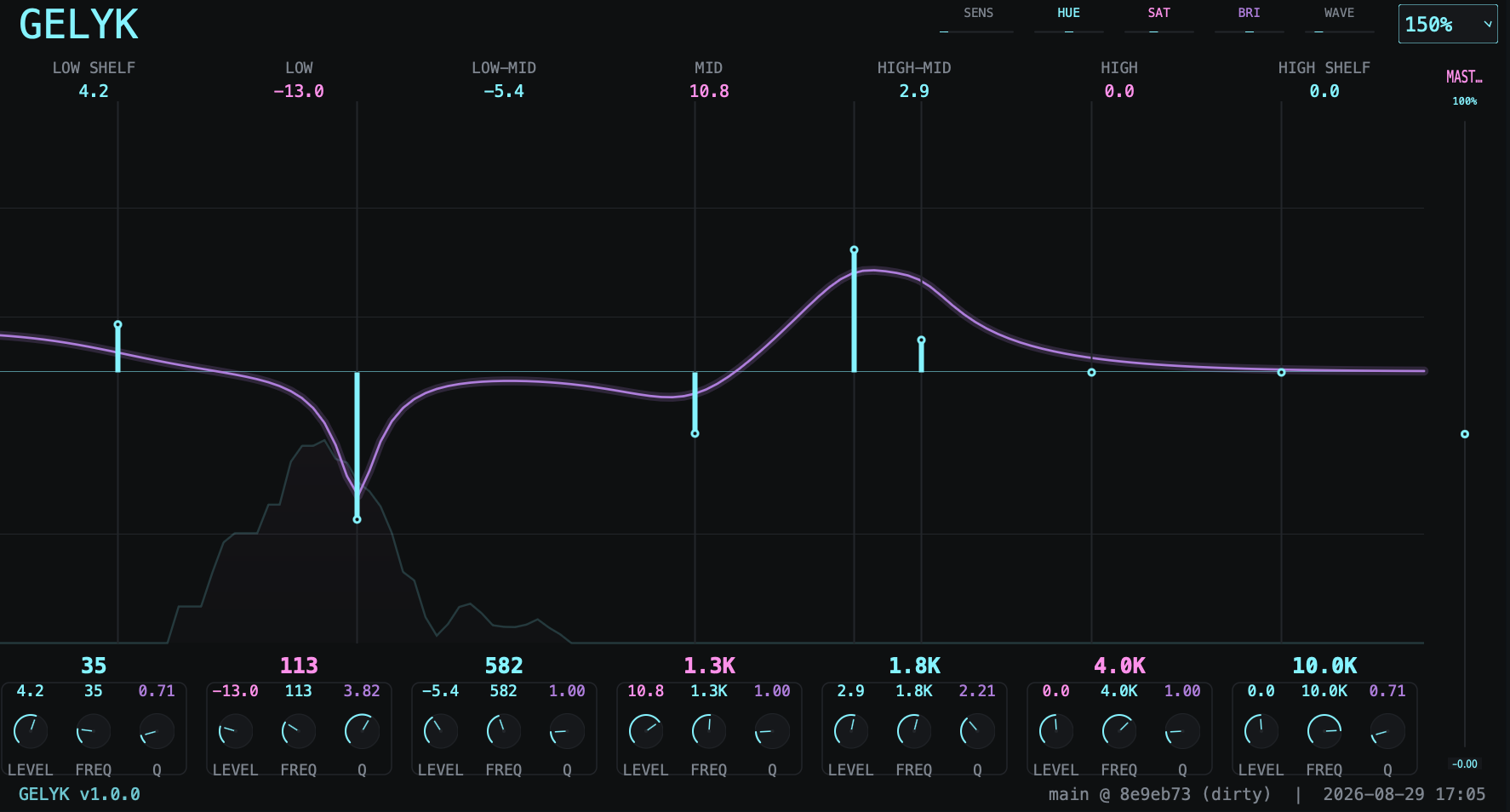
A minimalist 7-band parametric equalizer with a cyber/neon UI, built on JUCE (JUCE 8). It ships as an AU and VST3 plugin.
This README is intentionally verbose: it covers what the plugin is, how it is structured, how every band behaves, and how to build it from source on any platform - including Linux/Artix without the WebKitGTK/GTK developer headers.
What it is
Gelyk EQ is an audio effects plugin for mixing and mastering. It provides seven independent EQ bands covering the full ~20 Hz – 20 kHz spectrum, plus a master output gain, wrapped in a dark, glowing "neon" interface.
Rather than a dense wall of identical knobs, each band is laid out as a large drag-to-shape fader (the "gain curve") in a shared visualiser. Dragging gives you one-glance sight of the summed response you are actually shaping.
The band layout
Seven filters run in series, logarithmically spaced across the spectrum:
| Band | Filter type | Default frequency | Default Q |
|---|---|---|---|
| 0 | Low shelf | 60 Hz | 0.71 |
| 1 | Peak/parametric | 160 Hz | 1.0 |
| 2 | Peak/parametric | 400 Hz | 1.0 |
| 3 | Peak/parametric | 800 Hz | 1.0 |
| 4 | Peak/parametric | 1.6 kHz | 1.0 |
| 5 | Peak/parametric | 4 kHz | 1.0 |
| 6 | High shelf | 10 kHz | 0.71 |
Parameter ranges
| Parameter | Range | Default |
|---|---|---|
| Gain (per band) | −24 … +24 dB | 0 dB |
| Frequency | 20 … 20,000 Hz | per band (skewed, centre 1 kHz) |
| Q (per band) | 0.1 … 6.0 | per band |
| Master | −24 … +24 dB | 0 dB |
All parameters are smoothed per-block to avoid zipper noise, and remember their
state between sessions via a JUCE AudioProcessorValueTreeState.
On-screen controls
- The visualiser - the main field shows:
- the live input spectrum (a realtime FFT analyser), drawn as a glowing, filled waveform;
- the static summed EQ curve (the actual filter response), overlaid on the same log-frequency axis so peaks line up with their bands;
- the neon 0 dB centre line and reference grid.
- Per-band faders - drag a band vertically to change its gain, horizontally to move its frequency, or use the mouse wheel to nudge its Q. The knobs and numeric readouts below each fader are permanently linked to it.
- LEVEL / FREQ / Q knobs - an alternative, precise way to edit the currently hovered band.
- MASTER fader - output trim.
- SENS slider - vertical offset for the live spectrum trace (how visually "hot" the analyser appears; the display is pre-tuned to real per-FFT-bin levels, so it reads meaningfully without touching this).
- WAVE slider - opacity of the live spectrum waveform.
- HUE / SAT / BRI sliders - recolor the entire palette (colour-shift, global saturation and brightness) for a custom neon look.
- SCALE selector - fractional UI scaling for high-DPI or small screens.
- A status bar shows the build version and, when the plugin is built from a git checkout, the current branch/commit and dirty state.
Controls at a glance
| Control | Mouse down / drag | Mouse wheel |
|---|---|---|
| Band fader | Vertical = gain | Adjusts band Q |
| Horizontal = frequency | ||
| Per-band knobs | Rotate = value | - |
| Master fader | Vertical = output gain | - |
Double-click any knob or fader to reset it to its default value.
Project structure
Source/
  PluginProcessor.h/cpp   AudioProcessor, parameter layout, state + audio pipeline
  PluginEditor.h/cpp      The neon UI: visualiser, faders, knobs, color controls
  EqualizerDSP.h/cpp      FilterBand IIR biquad + the background SpectrumAnalyser (FFT)
  GitInfo.h.in            Template for the git build-info header, filled by CMake
CMakeLists.txt            Build configuration (JUCE 8, AU + VST3, CMake 3.15+)
Makefile                  Convenience wrapper: build, install, codesign
DSP highlights (EqualizerDSP)
Each FilterBand is a set of JUCE IIR biquad coefficients, recalculated
cheaply whenever gain/frequency/Q change and continuously smoothed toward the
target. The channels run stereo-locked so the summed response is identical on
left and right.
The SpectrumAnalyser runs on a background thread: it fills a circular ring
buffer from the input, and periodically Hann-windows the most recent 4096
samples and runs a realtime FFT to produce the magnitude spectrum the editor
renders (aggregated into log-spaced bins from 20 Hz to 20 kHz).
Building
Requirements
- CMake 3.15+ and a C++17 compiler (Clang, GCC, or MSVC).
- JUCE 8.0.7 - fetched automatically
by CMake via
FetchContentwhenJUCE_ROOTis not set. To reuse an existing checkout, configure with-DJUCE_ROOT=/path/to/JUCE.
Configure & build
cmake -S . -B build -DCMAKE_BUILD_TYPE=Release
cmake --build build --config Release -j$(nproc)
The plugins are placed in build/GelykEQ_artefacts/<config>/AU (and VST3).
On macOS the bundled Makefile also installs both formats into your user plugin
folders and refreshes the system registry:
make            # configure + build
make install    # copy into ~/Library/Audio/Plug-Ins and codesign
Linux / Artix note (no GTK or WebKitGTK headers required)
The plugin does not depend on GTK or WebKitGTK developer headers, so it
builds cleanly on minimal/headless-flavored distros such as Artix - no
webkit2gtk, gtk3-devel, libsoup or jsc packages needed.
This is guaranteed in CMakeLists.txt:
target_compile_definitions(GelykEQ PRIVATE JUCE_WEB_BROWSER=0)
JUCE's Linux FileChooser in JUCE 8 no longer links GTK either - it shells out
to zenity/kdialog at runtime, and Gelyk never opens a native file dialog.
Disabling JUCE_WEB_BROWSER removes the WebKitGTK-backed WebBrowserComponent
(which Gelyk does not use), eliminating the entire GTK/WebKit include chain.
If you ever do need native file dialogs at runtime (outside Gelyk), install
zenityorkdialog.
License
See the JUCE license for the framework; the Gelyk EQ source follows the same licensing model. (Adjust per your chosen licensing.)