- C 58.8%
- C++ 35.6%
- Python 3.6%
- CMake 1.9%
| cmake | ||
| docs | ||
| examples | ||
| include/xtc | ||
| packaging | ||
| screenshots | ||
| src | ||
| tests | ||
| third_party | ||
| tools | ||
| .gitattributes | ||
| .gitignore | ||
| AGENT.md | ||
| AUTHORS | ||
| CMakeLists.txt | ||
| CMakePresets.json | ||
| LICENSE | ||
| Makefile | ||
| README.md | ||

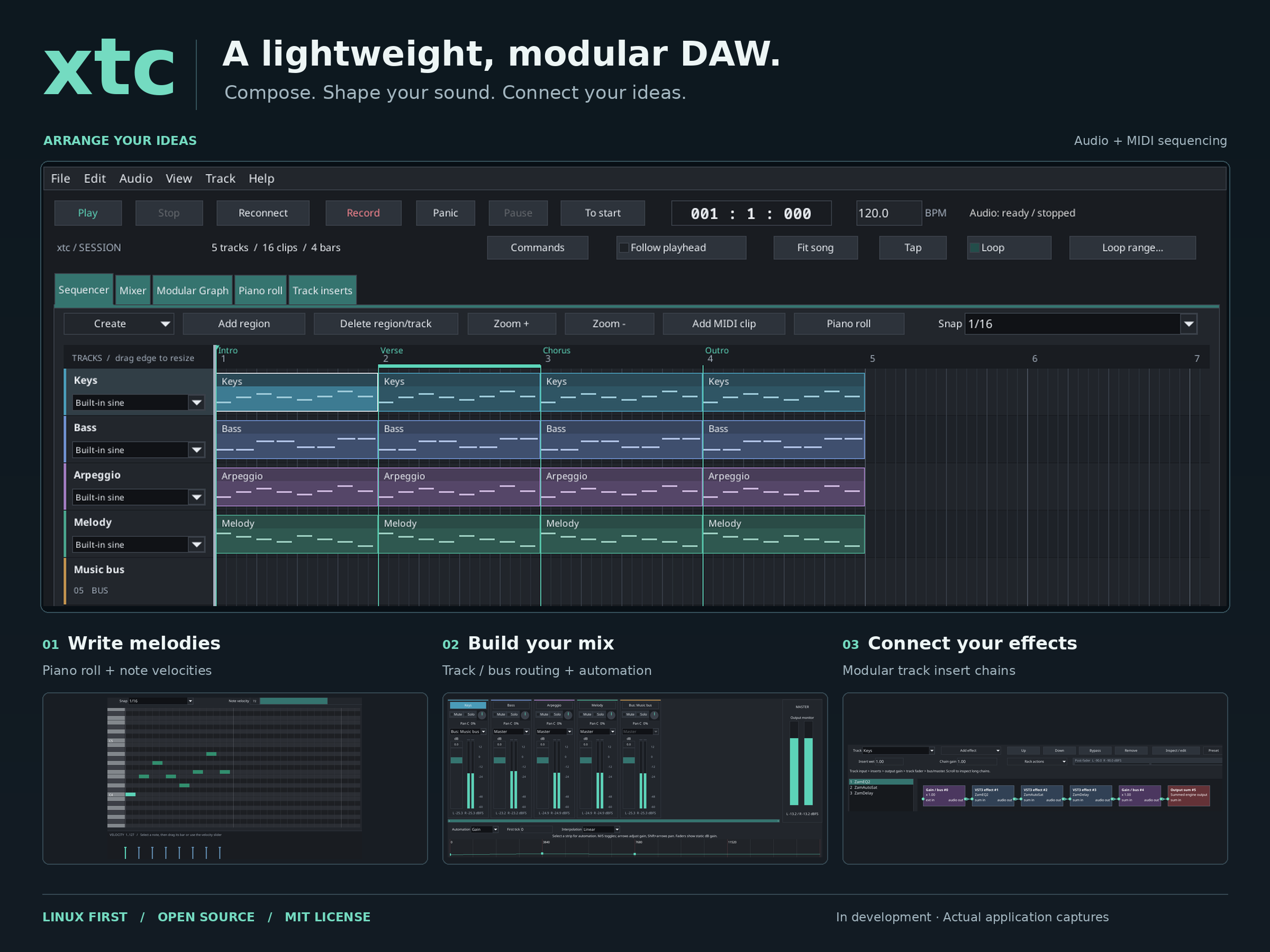
xtc — a lightweight, modular DAW
xtc is a new, energyXT-inspired digital audio workstation project. It is not a clone and contains no energyXT source code or assets.
Design decisions
- Modular engine first: sequencer, instruments, effects, mixers and I/O are nodes in one processing graph.
- C core: project model, graph, DSP and audio engine are implemented in C.
- FLTK/C++ GUI: C++ is confined to the graphical interface and calls the core through a C API.
- Linux first: keep backend-specific details behind an interface.
- Small increments: build and test each milestone before adding features.
Current status
This repository is a starter scaffold, not a production DAW. It currently provides:
- a small C library/API;
- a mono graph model with port validation, cycle rejection and topological ordering;
- compiled offline plans with preallocated buffers, sine oscillator, audio source, gain, meter and output nodes;
- C tests for deterministic rendering, routing, validation and lifecycle;
- an optional JACK-compatible backend with mono input and mono/stereo output with start/stop, routing and status;
- safe control/audio plan handoff and concurrent replacement tests;
- an optional FLTK shell with engine controls, view switching and backend status;
- a modular graph editor with transactional edits and live plan adoption status;
- versioned project save/load and a timeline for tracks and clips;
- sample-counted transport, selection, move/trim, timeline zoom and scrolling;
- WAV import/graph playback, bounded recording and missing-asset relinking;
- MIDI clips, a sine instrument, JACK MIDI input and a basic piano roll;
- stereo track/bus gain/pan/mute/solo, dBFS peak meters and gain/pan automation lanes;
- bounded undo/redo with keyboard shortcuts;
- configurable boundary fades, gain ramps and graceful GUI playback transitions;
- native C processors, deterministic source packaging and staged install/uninstall;
- architecture, format, GUI, roadmap, and decision documents.
The JACK backend has passed software-loopback testing; physical-device playback and capture are unverified. MIDI recording remains deferred. Bounded LADSPA hosting supports the compatible mono processors documented in PLUGIN_HOSTING.md.
Build
Requirements: CMake 3.25+, a C99 compiler, Python 3.12+ and a build backend such as Ninja or Unix Makefiles. The optional GUI needs C++17 and FLTK; JACK and LADSPA development files enable their optional integrations.
cmake -S . -B build -DCMAKE_BUILD_TYPE=Debug
cmake --build build --parallel
ctest --test-dir build --output-on-failure
For quick development, the optional Make wrapper provides the same workflow:
make          # configure and build
make test     # build and run CTest
make gui      # build just the FLTK application
make run      # build and launch it
make clean    # clean products; keep the CMake cache
Override BUILD_DIR, BUILD_TYPE or JOBS as needed, for example
make BUILD_DIR=build/release BUILD_TYPE=Release JOBS=8. Pass additional options
with CMAKE_ARGS and CTEST_ARGS. CMake remains the authoritative build system.
This builds libxtc.a, the headless xtc-check, tests, examples and the FLTK
application when available. Live JACK tests are opt-in. Use -DXTC_BUILD_GUI=OFF
for the C-only build, or the debug, release, minimal and sanitize presets
for separate configurations. See docs/BUILD.md for options,
focused tests, installation and IDE setup. Phase 108 records
the CMake migration.
Run the GUI:
./build/xtc
See the minimal music-making workflow for creating, saving, reopening and playing a project.
The GUI opens JACK and offers Play/Pause/Stop/To start/Reconnect, backend status and view
switching. The initial empty graph is silent. Modular Graph supports adding,
moving and deleting oscillator/audio/instrument/gain/meter/output nodes and connecting ports.
Import WAV (Ctrl+I) creates playable clips; Add region creates silent placeholders.
Record captures JACK input to a chosen WAV; Stop finalizes and adds the take.
Save the project after recording. External asset paths must remain available;
select a missing clip and use File/Relink selected audio to repair it.
Add MIDI clip on an existing track, then open Piano roll (or Ctrl+5 for the selected track) to draw notes.
Connect a MIDI source to the JACK midi_in port for live playing; Panic/F9
silences held notes. See MIDI workflow and limits.
See audio workflow and limits and the
sample editor workflows.
Mixer (Ctrl+2) selects a track for gain/pan/mute/solo and automation editing.
Ctrl+Z undoes; Ctrl+Shift+Z or Ctrl+Y redoes up to 32 edits.
The GUI now exposes left output and output_right JACK ports; route both
explicitly for stereo. See mixer workflow and limits.
Use Add track/Add region, drag regions or their edges, and Zoom +/-; scrollbars pan.
Ctrl+N/O/S creates, opens or saves a project; Save As chooses another path.
Arrangement edits stop playback; graph edits remain live.
The ruler seeks while stopped. Stop pauses; Reconnect and project load reset position. F5 starts, F8 stops, Space toggles, F6 reconnects, and Ctrl+1/2/3
switches views. Ctrl+Q closes the client and window. No physical ports are
connected automatically. In Modular Graph, drag output to input to connect;
select a node or wire and press Delete to remove it. Invalid edits leave the
active graph intact; queued changes are labeled until the engine adopts them.
See GUI documentation.
For Linux installation, routing and CLI options see LINUX.md;
for native effects/instruments see NATIVE_API.md.
The release preset and CMake’s dist, test-install, test-release and
test-package targets provide release preparation; see
RELEASING.md for exact guarantees.
With JACK development files and an existing JACK-compatible server, configure
with -DXTC_ENABLE_LIVE_TESTS=ON, build, and run
ctest --test-dir build --output-on-failure -L live. These software-loopback
checks connect only test clients. See engine documentation
for configuration, routing, ownership and recovery.
Clean generated files:
cmake --build build --target clean
Suggested first agent task
Read AGENT.md and docs/ARCHITECTURE.md. Inspect the existing implementation, run cmake --build build --target check, and report gaps before adding the next feature. Do not jump directly to plugin hosting or a full sequencer.
License
The project is scaffolded under the MIT License; see LICENSE. Review the licenses of any future dependencies before distribution.
Audio timing, transitions, latency limits and listening previews are described in docs/AUDIO_QUALITY.md. Human listening acceptance of the transitions remains pending.
The engine adds no-clobber recording/recovery, parameterized native C processors, and trusted in-process LADSPA hosting with persisted identity/control values. See RECOVERY.md, NATIVE_API.md and PLUGIN_HOSTING.md for commands and limits.
For everyday use see USER_MANUAL.md,
KNOWN_LIMITATIONS.md and
MAINTENANCE.md. xtc-check --diagnose reports build features;
cmake --build build --target test-package checks a local system-linked Linux binary archive.
Effect automation/controllers, editing commands, v7 project-folder media paths,
performance baselines and release/installation checks are also supported.
Non-destructive audio splitting, clip gain/fades and cached timeline waveforms
are supported, with undo and v8 persistence (reading v1–v7). See
AUDIO_FILES.md.
cmake --build build --target test-audio-editing checks source preservation and exact boundary output.
Time stretching and independent pitch shifting remain deferred.
Signal-flow graph layout, routing diagnostics, direction/role indicators and
atomic unity-gain insertion into a wire are supported. See
ROUTING.md; cmake --build build --target test-routing verifies the C routing contract.
One-level mix buses, routing, coherent track/bus peaks and master clipping indicators are supported, persisted in v9 (reading v1–v8). See MIXER.md.
LADSPA descriptor browsing, an identity/parameter editor with reset, transactional replacement and insertion into graph wires are supported. See PLUGIN_HOSTING.md for compatibility and lifecycle limits.
Common parameter targets, Linear/Hold mixer automation and saved per-channel live MIDI CC bindings are supported. Project v10 reads v1–v9. See CONTROL.md for timing, precedence and qualification limits.
Undo storage is reserved before edits/publication, completed takes are grouped, surviving editor selections are preserved and context menus/focus feedback are improved. See EDITING.md for the workflow audit and failure boundaries.
Project troubleshooting: xtc-check --validate PROJECT.xtc reports metadata
errors with the expected record and syntax line. xtc-check --inspect PROJECT.xtc
lists resolved media/module paths and plugin identities without executing plugins
or starting JACK. Exit codes: 0 = valid metadata and available files, 2 = missing
or unreadable references, 1 = metadata/I/O error. File availability does not
certify WAV contents or plugin compatibility. See PROJECT_FORMAT.md
for the compatibility and relocation policy.
File → Load plugin supports LADSPA plus an initial Linux
CLAP/VST2/VST3 effect subset. Select the actual module binary (.clap or .so,
including a VST3 bundle's inner binary). Modern effects require one mono input
and output, float32 and zero latency; they use default configuration. Instruments,
modern parameter editing/automation, opaque state and custom editors are not
implemented. Projects now save v11 and read v1–v11. See PLUGIN_HOSTING.md for the
full contract and test/qualification limits.
A compact sequencer Create menu, optional track inspector and per-track modular effect chains are supported. Open View → Track inserts (or Ctrl+5 for the selected track) to add, search, reorder, bypass, inspect and mix mono LADSPA/VST2/VST3/CLAP effects or internal devices. Chains support undo, presets, audio/MIDI rendering and export. Projects save format 17 and read formats 1–17. See track insert workflows and limits and the screenshot gallery.
Direct selected-track inserts, effect duplication, chain copy/ paste, A/B snapshots, three internal effect templates, bulk rack actions, insert peak meters, tap tempo, audio crossfades and MIDI chord strumming are supported. See creative workflows and limits.
MIDI devices and defaults are configurable in Preferences → midi, including
JACK/PipeWire input/output choices, channel filtering and optional thru. Use
File → Import MIDI or Export selected clip as MIDI to exchange note clips.
Application preferences load from ~/.xtc.conf at startup and save on Apply
and clean exit. See configuration and MIDI workflows
for file support, routing and persistence details.
Steinberg SDK integration (Phase 106) adds conventional Linux
VST3 bundle loading, transport context, official-SDK gain/synth examples and
validator checks. Run cmake -S . -B build -DXTC_VST3_SDK_ROOT=/path/to/vst3sdk -DXTC_BUILD_STEINBERG=ON && cmake --build build --target test-steinberg-sdk
for optional SDK qualification. A Windows ASIO device diagnostic is provided;
a native ASIO playback/capture backend remains planned.
JUCE integration (Phase 107) provides an optional VST3/standalone
Soft Keys instrument with a native editor, DSP effects, presets, MIDI-to-WAV
rendering and VST3 hosting examples. Build and qualify it with
cmake -S . -B build -DXTC_JUCE_ROOT=/path/to/JUCE -DXTC_BUILD_JUCE=ON && cmake --build build --target test-juce; review JUCE’s AGPLv3/commercial licence
before distributing linked binaries. See the examples.