| .. | ||
| theme | ||
| preferences.txt | ||
| README.md | ||
| screenshot.png | ||


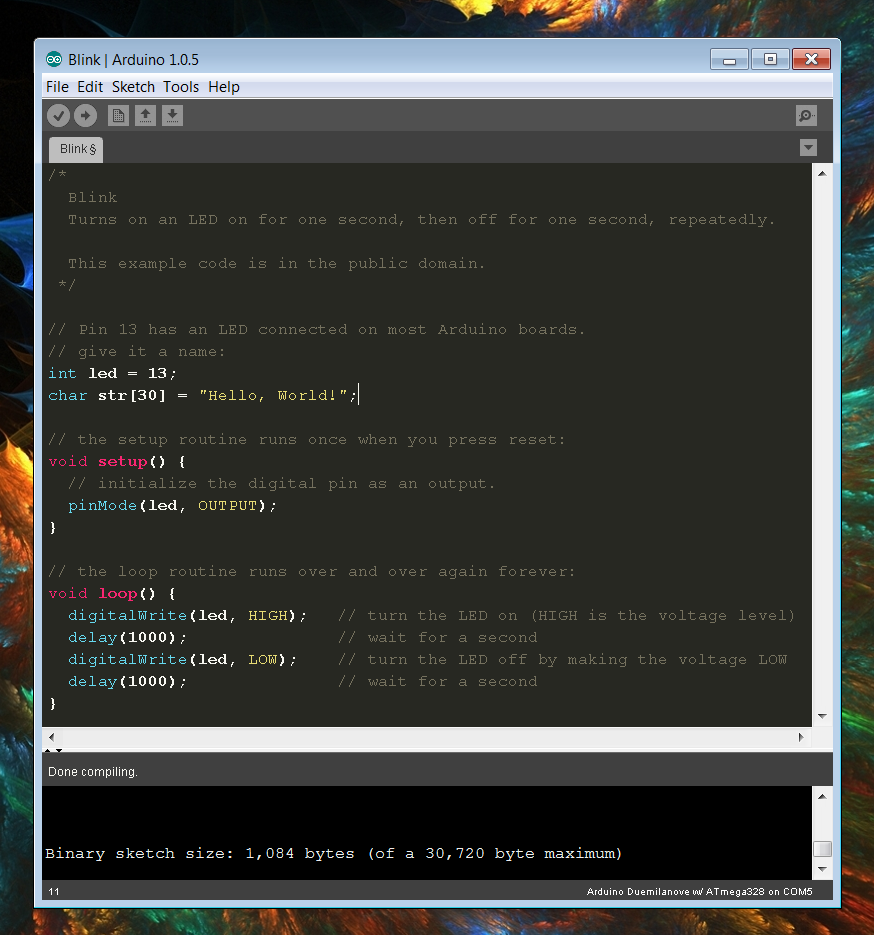
Monokai Arduino Theme
If you love Sublime Text 2 and the Monokai Color Style, here's a similar theme/skin for the Arduino IDE. There are not enough system variables to make it exact, but it's much better than the default.
- - -
####INSTALLATION
- PREFERENCES.TXT
On Windows, located here:%AppData%\Roaming\Arduinoreplace yourpreferences.txtwith mine. - THEME FOLDER
On Windows, located here:..\arduino-1.0.5\lib\replace thethemefolder inside (making a copy of the original in case you hate my changes!) This folder contains a 'themes.txt' file with the bulk of the changes (mostly colors). Buttons and tabs are stored as image files, which have been modified to fit the color scheme
####PSD 'BUTTONS' FILE
The theme folder also includes a Photoshop (.psd) file for the buttons which includes a saved selection for easier changing of the background. This can be accessed through the 'Channels' panel.
- - -
all code available under [Creative Commons BY-NC-SA license](http://creativecommons.org/licenses/by-nc-sa/3.0/) - feel free to use but please include credit to all authors ####CREDITS
- Images - Jeff Thompson https://github.com/jeffThompson/DarkArduinoTheme
- Monokai Styling (Theme.txt, Preferences.txt) - Technobly https://github.com/technobly/MonokaiArduinoTheme