- C++ 82.5%
- Rich Text Format 8.1%
- Shell 4.6%
- CMake 2.6%
- Makefile 1.2%
- Other 1%
 7efcd527cf
modules/ is gitignored, so local Gin edits cannot live in the submodule. They are stored in patches/ and re-applied (idempotently) before every configure and build via 'make apply-patches'. Also improve the submodule guard: git submodule update is a no-op here, so print concrete restore instructions instead. |
||
|---|---|---|
| .github | ||
| ci | ||
| Installer | ||
| patches | ||
| plugin | ||
| screenshots | ||
| .gitignore | ||
| .gitmodules | ||
| AGENTS.md | ||
| Changelist.txt | ||
| CMakeLists.txt | ||
| CMakePresets.json | ||
| LICENSE | ||
| Makefile | ||
| Manual.md | ||
| README.md | ||
| release.sh | ||
| tag.sh | ||
| VERSION | ||
Wavetable - personal fork with some modifications
A 2 oscillator wavetable synthesizer with flexible modulation options. See https://github.com/FigBug/Wavetable for the upstream code project and https://socalabs.com/synths/Wavetable/ for the product page.
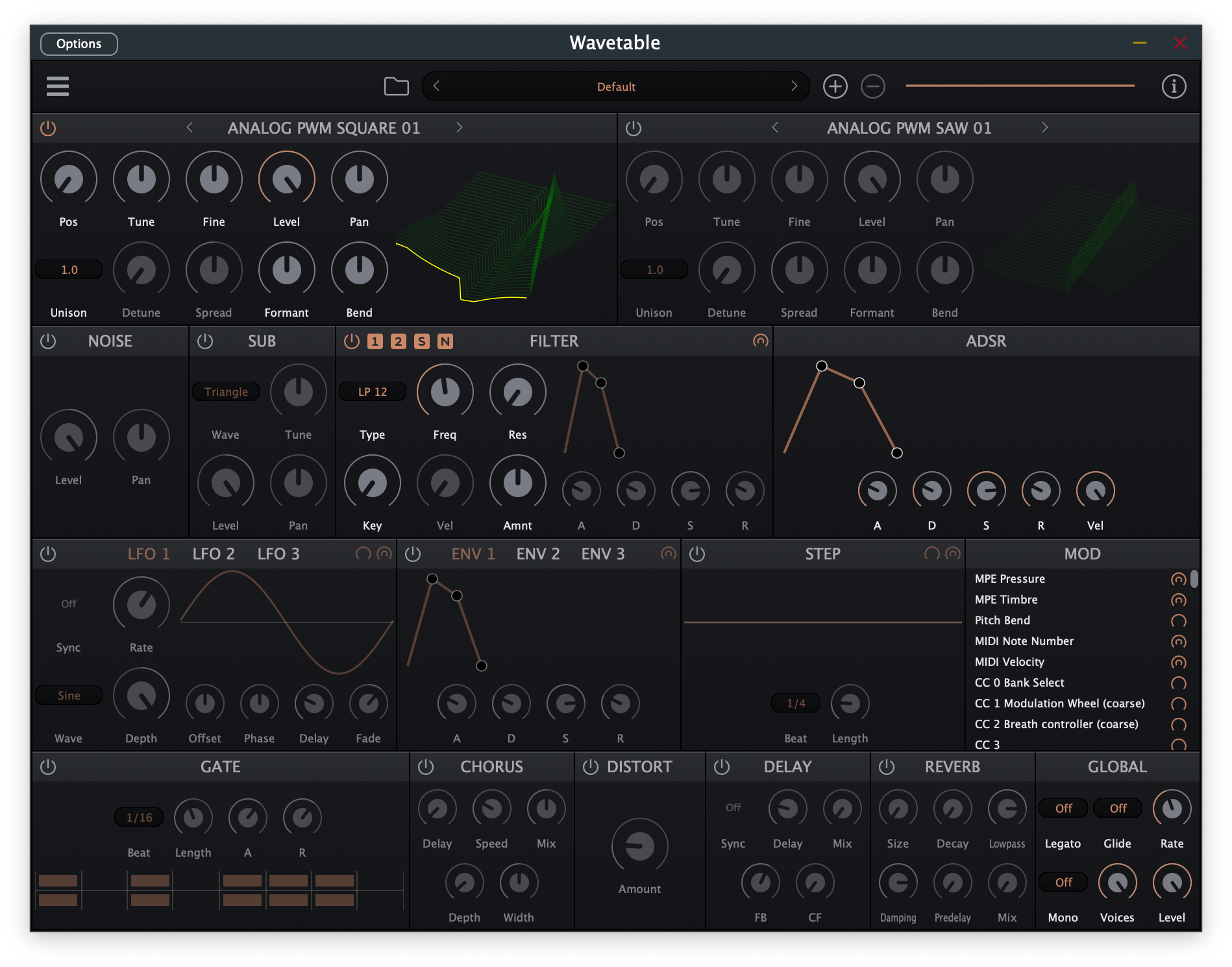
Features
Oscillators
- 2 wavetable oscillators with position, tune, fine tune, level, and pan controls
- Unison with up to 8 voices per oscillator, detune, and stereo spread
- Formant and bend controls for wavetable manipulation
- Load custom wavetables from WAV files (supports 256, 512, 1024, 2048 sample sizes)
- Sub oscillator with selectable waveforms
- Noise generator with multiple noise types
Filter
- Multi-mode filter (LP, HP, BP, Notch, etc.)
- Dedicated filter ADSR envelope
- Key tracking and velocity tracking
- Per-source routing (OSC1, OSC2, Sub, Noise)
Modulation
- 3 LFOs with sync-to-tempo option
- 3 modulation envelopes
- 32-step sequencer
- Comprehensive modulation matrix
- MPE support
Effects
- Gate (16-step pattern sequencer)
- Chorus
- Distortion (Simple, Bitcrusher, Fire Amp, Grind Amp modes)
- Delay (free or tempo-synced)
- Reverb
Global
- Mono/Poly modes
- Glide with legato option
- MTS-ESP microtuning support
Formats
- VST3
- VST2 (requires VST2 SDK)
- AU (macOS)
- CLAP
- LV2
- Standalone
System Requirements
- macOS 10.13 or later
- Windows 10 or later
- Linux (Ubuntu 20.04 or compatible)
Building on macOS (ARM64 / Apple Silicon)
Prerequisites
- Xcode (with Command Line Tools)
- CMake 3.24+ (
brew install cmake) - Git
Clone & Build
git clone --recursive https://github.com/FigBug/Wavetable.git
cd Wavetable

# Configure (generates Xcode project, universal arm64 + x86_64)
cmake --preset xcode

# Build Release
cmake --build --preset xcode --config Release
Build products are in Builds/xcode/Wavetable_artefacts/Release/:
| Format | Path |
|---|---|
| Standalone | Standalone/Wavetable.app |
| VST | VST/Wavetable.vst |
| VST3 | VST3/Wavetable.vst3 |
| AU | AU/Wavetable.component |
| CLAP | CLAP/Wavetable.clap |
Install via Installer (.pkg)
Build the signed/notarized installer (or unsigned for local use):
./installer/build.sh
# Output: installer/macOS/bin/Wavetable.pkg
Open Wavetable.pkg and follow the installer. It installs:
| Component | Install Location |
|---|---|
| VST | /Library/Audio/Plug-Ins/VST/ |
| VST3 | /Library/Audio/Plug-Ins/VST3/ |
| AU | /Library/Audio/Plug-Ins/Components/ |
| CLAP | /Library/Audio/Plug-Ins/CLAP/ |
| Factory wavetables & presets | /Library/Audio/Presets/SocaLabs/Wavetable/ |
Install Manually (no installer)
Copy the built bundles to the system plugin directories:
# AU (Logic Pro, GarageBand)
cp -R Builds/xcode/Wavetable_artefacts/Release/AU/Wavetable.component \
      ~/Library/Audio/Plug-Ins/Components/

# VST3 (Ableton Live, Reaper, Bitwig, etc.)
cp -R Builds/xcode/Wavetable_artefacts/Release/VST3/Wavetable.vst3 \
      ~/Library/Audio/Plug-Ins/VST3/

# CLAP (Ableton Live 12+, Bitwig, Reaper)
cp -R Builds/xcode/Wavetable_artefacts/Release/CLAP/Wavetable.clap \
      ~/Library/Audio/Plug-Ins/CLAP/

# VST (legacy)
cp -R Builds/xcode/Wavetable_artefacts/Release/VST/Wavetable.vst \
      ~/Library/Audio/Plug-Ins/VST/
Install factory wavetables and presets:
mkdir -p ~/Library/Audio/Presets/SocaLabs/Wavetable
cp -R plugin/Resources/WavetablesFLAC \
      ~/Library/Audio/Presets/SocaLabs/Wavetable/Wavetables

# Presets must be flattened (subdirectories are not scanned by the plugin)
find plugin/Resources/Presets -name "*.xml" -exec \
  cp {} ~/Library/Audio/Presets/SocaLabs/Wavetable/ \;
After copying, rescan plugins in your DAW. For AU, you may need to log out and back in, or run:
killall -9 AudioComponentRegistrar
Parameter Reference
Oscillators
Two identical wavetable oscillators provide the main sound source.
| Parameter | Range | Description |
|---|---|---|
| Enable | On/Off | Enable or disable the oscillator |
| Wavetable | - | Select from built-in wavetables or load custom WAV files |
| Tune | -36 to +36 semitones | Coarse pitch adjustment |
| Fine | -100 to +100 cents | Fine pitch adjustment |
| Level | -100 to 0 dB | Oscillator volume |
| Pos | 0-100% | Wavetable position - morphs through the wavetable frames |
| Pan | -100% to +100% | Stereo panning |
| Formant | -1.0 to +1.0 | Formant shifting for tonal variation |
| Bend | -1.0 to +1.0 | Pitch bend modulation amount |
| Voices | 1-8 | Number of unison voices |
| Detune | 0-0.5 | Pitch spread between unison voices (enabled when Voices > 1) |
| Spread | -100% to +100% | Stereo spread of unison voices (enabled when Voices > 1) |
| Retrig | On/Off | Retrigger oscillator phase on each new note |
Tip: Drag on the wavetable display to adjust the position in real-time.
Sub-Oscillator
| Parameter | Range | Description |
|---|---|---|
| Enable | On/Off | Enable or disable the sub-oscillator |
| Wave | Sine, Triangle, Saw Up, Pulse 50%, Pulse 25%, Pulse 12% | Waveform selection |
| Tune | -36 to +36 semitones | Pitch adjustment |
| Level | -100 to 0 dB | Volume |
| Pan | -100% to +100% | Stereo panning |
| Retrig | On/Off | Retrigger phase on new notes |
Noise Generator
| Parameter | Range | Description |
|---|---|---|
| Enable | On/Off | Enable or disable noise |
| Type | White, Pink | Noise color |
| Level | -100 to 0 dB | Volume |
| Pan | -100% to +100% | Stereo panning |
Filter
Multi-mode filter with envelope control and key/velocity tracking.
Filter Types: LP 12, LP 24, HP 12, HP 24, BP 12, BP 24, NT 12, NT 24
| Parameter | Range | Description |
|---|---|---|
| Enable | On/Off | Enable or disable the filter |
| Type | See above | Filter type selection |
| Frequency | 20 Hz - 20 kHz | Cutoff frequency |
| Resonance | 0-100% | Filter resonance/Q |
| Key | 0-100% | Keyboard tracking amount |
| Velocity | 0-100% | Velocity to filter frequency modulation |
| Amount | -1.0 to +1.0 | Filter envelope modulation depth |
Filter Envelope:
| Parameter | Range | Description |
|---|---|---|
| Attack | 0-60 seconds | Attack time |
| Decay | 0-60 seconds | Decay time |
| Sustain | 0-100% | Sustain level |
| Release | 0-60 seconds | Release time |
| Retrig | On/Off | Retrigger envelope on new notes |
Filter Routing: Use the routing buttons (WT1, WT2, Sub, Noise) to select which sound sources are processed by the filter.
Amplitude Envelope
| Parameter | Range | Description |
|---|---|---|
| Attack | 0-60 seconds | Attack time |
| Decay | 0-60 seconds | Decay time |
| Sustain | 0-100% | Sustain level |
| Release | 0-60 seconds | Release time |
| Velocity | 0-100% | Velocity sensitivity |
| Retrig | On/Off | Retrigger on new notes (mono mode with glide only) |
LFOs
Three independent LFOs with multiple waveforms.
Waveforms: None, Sine, Triangle, Saw Up, Saw Down, Square, Square+, Sample & Hold, Noise, Step Up (3/4/8 steps), Step Down (3/4/8 steps), Pyramid (3/5/9 steps)
| Parameter | Range | Description |
|---|---|---|
| Enable | On/Off | Enable or disable the LFO |
| Wave | See above | Waveform selection |
| Sync | On/Off | Sync to host tempo |
| Rate | 0-50 Hz | LFO speed (when Sync is off) |
| Beat | Note values | LFO speed (when Sync is on) |
| Depth | -1.0 to +1.0 | Modulation amount |
| Phase | -1.0 to +1.0 | Starting phase offset |
| Offset | -1.0 to +1.0 | DC offset/center bias |
| Fade | -60 to +60 seconds | Fade in (positive) or fade out (negative) time |
| Delay | 0-60 seconds | Delay before LFO starts |
| Retrig | On/Off | Retrigger phase on new notes |
Modulation Envelopes
Three independent ADSR envelopes for modulation.
| Parameter | Range | Description |
|---|---|---|
| Enable | On/Off | Enable or disable the envelope |
| Attack | 0-60 seconds | Attack time |
| Decay | 0-60 seconds | Decay time |
| Sustain | 0-100% | Sustain level |
| Release | 0-60 seconds | Release time |
| Retrig | On/Off | Retrigger on new notes |
Step LFO
A 32-step sequencer for rhythmic modulation.
| Parameter | Range | Description |
|---|---|---|
| Enable | On/Off | Enable or disable |
| Beat | Note values | Step clock speed (tempo-synced) |
| Length | 2-32 steps | Number of active steps |
| Retrig | On/Off | Retrigger sequence on new notes |
| Steps 1-32 | -1.0 to +1.0 | Individual step values |
Modulation Matrix
The mod matrix routes any modulation source to any parameter with flexible depth, curve shaping, and polarity controls.
Source types: Single ring = mono (global), double ring = poly (per-voice).
MIDI sources: Pitch Bend (mono), Note Number (poly), Velocity (poly), CC 1-120 (mono)
MPE sources (when enabled): Pressure (poly), Timbre (poly), Pitch Bend (poly)
Internal sources: LFO 1-3 poly/mono, Step LFO poly/mono, Filter Envelope, Mod Envelopes 1-3
Assigning modulation:
- Drag and Drop - Drag a source icon from the mod source list onto any knob
- Learn Mode - Click a source icon, then click a knob to assign
Matrix panel controls: Enable toggle, depth slider, bipolar button, curve button, delete button.
Polarity: Unipolar (0 to 1) or Bipolar (-1 to +1).
Curves: Linear, Quadratic (In/Out/In-Out), Sine (In/Out/In-Out), Exponential (In/Out/In-Out), plus inverted versions of all.
Effects
Effects can be reordered by dragging.
Gate: Beat, Length (2-16 steps), Attack, Release, L/R step pattern
Chorus: Delay (0.1-30 ms), Rate (0.1-10 Hz), Depth (0.1-20 ms), Width, Mix
Distortion: Simple (Amount), Bitcrusher (Rate/Rez/Hard/Mix), Fire Amp (Gain/Tone/Output/Mix), Grind Amp (Gain/Tone/Output/Mix)
Delay: Sync, Time/Beat, Feedback, Crossfeed, Mix
Reverb: Size, Decay, Lowpass, Damping, Predelay, Mix
Global Settings
| Parameter | Range | Description |
|---|---|---|
| Level | -100 to 0 dB | Master output volume |
| Voices | 2-40 | Maximum polyphony |
| Mono | On/Off | Monophonic mode |
| Glide | Off, Glissando, Portamento | Pitch glide mode |
| Glide Time | 0.001-20 seconds | Glide duration |
| Legato | On/Off | Legato mode (mono only) |
| Pitch Bend | 0-48 semitones | MIDI pitch bend range |
| MPE | On/Off | Enable MPE support |
Tips & Tricks
- Rich Pads: Use both oscillators with different wavetables, slight detune, and long filter envelope
- Punchy Basses: Enable the sub-oscillator, use LP24 filter with short decay envelope
- Movement: Modulate wavetable position with an LFO for evolving textures
- Rhythmic Effects: Use the Step LFO or Gate effect for pulsing sounds
- Expression: Enable MPE and map pressure/timbre to filter cutoff and wavetable position
- Layering: Route oscillators differently through the filter for complex timbres
License
See the LICENSE file for license information.